POLAROID PROF700 HARD RESET
This Procedure Works for
1. Too Many Pattern Attempt
2. Password/ Pattern Lock
PROCEDURE:
1. PRESS and HOLD VOL.UP + POWER
2. WHEN ANDROID LOGO APPEARS
PRESS POWER TO ENTER RECOVERY MENU
3. SELECT WIPE CACHE PARTITION
SELECT WIPE DATA/ FACTORY RESET
(PRESS VOL.DOWN TO MOVE
PRESS VOL.UP TO ENTER)
4. SELECT REBOOT SYSTEM
PICTURES:
TAMARAW8,s helpful tips, tricks and software collections. (Member: www.gsmsandwich.com.ph, www.unitedgsm.com.ph, www.gsmfriendly.com.ph, www.gsmhosting.com)
Friday, January 23, 2015
Wednesday, January 21, 2015
MYPHONE FIRMWARE COLLECTIONS
Hi to all Technicians out there,
This are some of my Collected MYPHONE Firmwares/Flash file links.
Let's all give Thanks and Credits to Original Uploaders.
NOTE: Some Firmwares posted here are NOT personally tested by me,
so TRY IT AT YOUR OWN RISK!!!!!
SP FLASH TOOL---> DOWNLOAD HERE
FLASHING PROCEDURE:
1. Power Off the Phone
2. Open SP Flash Tool and load scatter file
3. Select Download only then Press Download
4. Press Volume Down then Connect USB Cable
SP FLASH Tool will automatically Flash your phone
Just wait until it finish
----------------------------------------------------------------------------------
MYPHONE OCEAN MINI
==================================================
MYPHONE AGUA RIO LITE
==================================================
NOTE: TO BE UPDATED WEEKLY....... TAMARAW8
CLOUDFONE FLASH FILES COLLECTION
Hi to all Technician out there..
This are some list of my Collected Cloudfone Firmwares/Flash Files links.
Let's all give Thanks and Credits to Original uploaders..
NOTE: Some Firmwares posted here are not Personally tested by me.. TAMARAW8
TRY IT AT YOUR OWN RISK!!!!
TOOLS:
RESEARCH DOWNLOAD MANAGER
DRIVER DOWNLOAD HERE
PROCEDURE of HOW to Remove Gmail Account or Pattern Lock
1.Open Reaserch Download Manager
2.Load packet and look for file
3. CHECK only the Following"
*FDL1
*FDL2
*User Data
4. Click in Back Up Tab and uncheck all then Press OK
5. Press the PLAY Button
PROCEDURE of HOW to FLASH
1. Open Reseach Download Manager
2.Load packet then look for file
3. Remove check in the following Selections:
*Erase Run Time NV
*PHASE_CHECK
*Erase Cache
*Erase Data
*Erase Misc
4. Click in BACK_UP Tab and uncheck all then Press OK
5. Press the PLAY Button to Flash your phone
-------------------------------------------------------------------------------------
TOOLS:
RESEARCH DOWNLOAD MANAGER
DRIVER DOWNLOAD HERE
PROCEDURE of HOW to Remove Gmail Account or Pattern Lock
1.Open Reaserch Download Manager
2.Load packet and look for file
3. CHECK only the Following"
*FDL1
*FDL2
*User Data
4. Click in Back Up Tab and uncheck all then Press OK
5. Press the PLAY Button
PROCEDURE of HOW to FLASH
1. Open Reseach Download Manager
2.Load packet then look for file
3. Remove check in the following Selections:
*Erase Run Time NV
*PHASE_CHECK
*Erase Cache
*Erase Data
*Erase Misc
4. Click in BACK_UP Tab and uncheck all then Press OK
5. Press the PLAY Button to Flash your phone
-------------------------------------------------------------------------------------
CLOUDFONE EXCITE 500D
Specifications
- 5" Dual Core Android
- Android 4.0 Ice Cream Sandwich
- 5.0" IPS WVGA Touchscreen
- 5MP AF Rear Camera w/ LED Flash, Front Camera
- 1.0 GHz Dual Core Snapdragon Processor
- Dual SIM Dual Standby
- ROM: 4GB, RAM: 512 MB
====================================================
CLOUDFONE THRILL 430G
====================================================
CLOUDFONE ICE 500e
====================================================
CLOUDFONE ICE 350e
Specifications
- Most Affordable Android Phone
- Android 2.3 Gingerbread
- 3.5" HVGA Touchscreen
- 2MP Rear Camera
- 1.0 GHz Processor
- Dual SIM Dual Standby
- ROM: 512 MB. RAM: 256MB
- Mobile TV
====================================================
...... to be updated weekly
Wednesday, January 7, 2015
MAKE YOUR OWN LED SIGNAGE FROM SCRAP/BROKEN LCD OF TABLET/LAPTOP
MATERIALS NEEDED:
1. 9v or 12v Cellphone or DVD Charger
2. Damaged/Broken Android Tablet LCDs or LAPTOP's LCD
3. PENTEL PEN or WHITE BOARD MARKER
4. Solder and Solder Leads
PROCEDURE:
1. Prepare the Materials Needed
2. Remove LCD Glass and Desolder LED's Flex from LCD's FLEX.
3. Cut Charger's wire and Resolder it to LED's Flex (+ to +, - to - )
4. Write Down your Sign using Pentel Pen/ White Board Marker
5. Reassemble your Customized Signage, Plug and Display it to add attraction for Customers.
Thank you for Viewing..
br. TAMARAW8
MATERIALS NEEDED:
1. 9v or 12v Cellphone or DVD Charger
2. Damaged/Broken Android Tablet LCDs or LAPTOP's LCD
3. PENTEL PEN or WHITE BOARD MARKER
4. Solder and Solder Leads
PROCEDURE:
1. Prepare the Materials Needed
2. Remove LCD Glass and Desolder LED's Flex from LCD's FLEX.
3. Cut Charger's wire and Resolder it to LED's Flex (+ to +, - to - )
4. Write Down your Sign using Pentel Pen/ White Board Marker
5. Reassemble your Customized Signage, Plug and Display it to add attraction for Customers.
Thank you for Viewing..
br. TAMARAW8
Tuesday, January 6, 2015
XPERIA LT26i TMPA DONE VIA FLASHING(COMPLETE PROCEDURE)
FILES NEEDED:
LT26i Firmware (IF you downloaded this with IDM it will be .zip, Just change .zip to .ftf and copy to c:\Flashtool\Firmwares\)
Flash Tool (Download and Install)
PROCEDURES:
1. Extract and install Flash Tool
2. Copy Downloaded Firmware to c:\Flashtool\Firmwares\
3. Open Flashtool
4. Click the ENERGY/THUNDER SIGN
5. Tick Flash Mode
6. Click OK
7. Select your device/Firmware
8. Click FLASH
When you see this
9. Turn Off the Phone, Press Volume Down only then Insert USB Cable
Flasher will Flash your phone
10. When you see " Flashing Finished", Remove your phone from USB and power it on
Congrats, Your phone was Successfully Flashed.
br. TAMARAW8
FILES NEEDED:
LT26i Firmware (IF you downloaded this with IDM it will be .zip, Just change .zip to .ftf and copy to c:\Flashtool\Firmwares\)
Flash Tool (Download and Install)
PROCEDURES:
1. Extract and install Flash Tool
2. Copy Downloaded Firmware to c:\Flashtool\Firmwares\
3. Open Flashtool
4. Click the ENERGY/THUNDER SIGN
5. Tick Flash Mode
6. Click OK
7. Select your device/Firmware
8. Click FLASH
9. Turn Off the Phone, Press Volume Down only then Insert USB Cable
Flasher will Flash your phone
10. When you see " Flashing Finished", Remove your phone from USB and power it on
Congrats, Your phone was Successfully Flashed.
br. TAMARAW8
Monday, December 29, 2014
SKYWORTH SKYPAD S7000 HARD RESET
1. PRESS VOL.UP + POWER
2.(WHEN SKYWORTH LOGO APPEARS)
Release Power while continue Pressing
Volume up, then simultaneously press
Power button every seconds until an
android LOGO Appears, and release
buttons.
3. When Android Logo Appeared,
Press Volume up + Power Button
for 2 to 3 seconds until a recovery
menu appears
4. choose using vol.up and vol.down
and Select/Enter using Power button.
1. PRESS VOL.UP + POWER
2.(WHEN SKYWORTH LOGO APPEARS)
Release Power while continue Pressing
Volume up, then simultaneously press
Power button every seconds until an
android LOGO Appears, and release
buttons.
3. When Android Logo Appeared,
Press Volume up + Power Button
for 2 to 3 seconds until a recovery
menu appears
4. choose using vol.up and vol.down
and Select/Enter using Power button.
br. TAMARAW8
Sunday, December 21, 2014
SAMSUNG GT-S6010 STOCK ROM 4.1.2 Vibrate ONly and No Recovery mode
SAMSUNG GT-S6010 STOCK ROM 4.1.2
PROBLEM: VIbrate ONly and No Recovery mode
FILES NEEDED:
ODIN 3.07
FIRMWARE 4.1.2
PROCEDURE:
1. Turn Off Battery and Enter Download mode (Vol.Down + Home Button + Power Button)
2. Run Odin 3.0.7
3. Click PDA, Browse and Select the Firmware you downloaded
(S6010XXUBME1_S6010OXABME1_S6010XXUBMD3_HOME.tar.md5)
4. Be sure that Re-Partiton is UNCHECK, Only Auto-Reboot is Checked.
5. Click START and wait 'till finished Flashing.
6. Congrats!
PROBLEM: VIbrate ONly and No Recovery mode
FILES NEEDED:
ODIN 3.07
FIRMWARE 4.1.2
PROCEDURE:
1. Turn Off Battery and Enter Download mode (Vol.Down + Home Button + Power Button)
2. Run Odin 3.0.7
3. Click PDA, Browse and Select the Firmware you downloaded
(S6010XXUBME1_S6010OXABME1_S6010XXUBMD3_HOME.tar.md5)
4. Be sure that Re-Partiton is UNCHECK, Only Auto-Reboot is Checked.
5. Click START and wait 'till finished Flashing.
6. Congrats!
Saturday, December 20, 2014
LATTE ICE TAB2 LV70Q HARD RESET
PROCEDURE
1. PRESS VOL.UP + VOL.DOWN + POWER
2. (WHEN ANDROID RECOVERY LOGO APPEARS)
PRESS AND HOLD POWER BUTTON THEN
PRESS VOLUME UP .
PROCEDURE
1. PRESS VOL.UP + VOL.DOWN + POWER
2. (WHEN ANDROID RECOVERY LOGO APPEARS)
PRESS AND HOLD POWER BUTTON THEN
PRESS VOLUME UP .
Wednesday, December 3, 2014
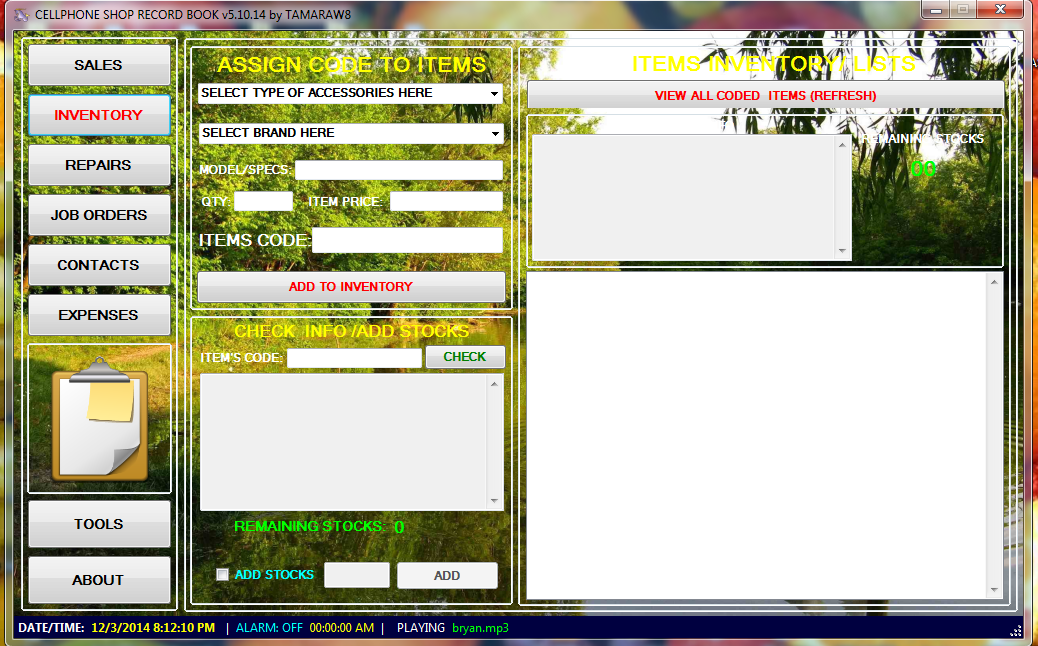
CELLPHONE SHOP RECORD BOOK V5
CELLPHONE SHOP RECORD BOOK v5!
Added Features:
Inventory System - For Cellphone Accessories Stock Records
Item's Code - For easy inventory and automatic Stock Checking when Sold.
Music Player - Play some music for good vibes and good moods.
Alarm Clock - For time checking
Background Nature Image - for relaxing view of user interface
Calendar - For easy access of calendar checking
Repair Records automatically added to Daily Sales Report
Contacts records with facebook link
Features:
Repair Records
Daily Sales Report Records
Expenses records
Job Order records
other added tools by TAMARAW8
Universal Shell
TAMAROID Color Game
Text Inverter
Download Here.
Added Features:
Inventory System - For Cellphone Accessories Stock Records
Item's Code - For easy inventory and automatic Stock Checking when Sold.
Music Player - Play some music for good vibes and good moods.
Alarm Clock - For time checking
Background Nature Image - for relaxing view of user interface
Calendar - For easy access of calendar checking
Repair Records automatically added to Daily Sales Report
Contacts records with facebook link
Features:
Repair Records
Daily Sales Report Records
Expenses records
Job Order records
other added tools by TAMARAW8
Universal Shell
TAMAROID Color Game
Text Inverter
Download Here.
Wednesday, November 19, 2014
2 PCS. LENOVO IDEAPAD K1 BOOTLOGO ONLY and TOO MANY PATTERN ATTEMPT, FULL PROCEDURE HERE
Good day to all!!..
I have here 2 pcs Lenovo Ideapad K1,
1 is TMPA and the other 1 is Boot Logo Hang-up Only.
Done with the same Procedure..
Flash with ZOOM rom.
Things Needed: (Drivers, Files, Images and Procedures in 1 pack)
1. Original Lenovo Ideapad K1 USB Cable
2. Firmware and drivers
3. Battery Must be at least 70% Charged
4. Windows 7 x86(32)..
Procedure.
1. Turn-off K1.
2. Enter APX MODE
~HOld Volume up + Volume Down + Power Button
~You may notify APX MODE if you see two LED lights Lit beside of HOME Button.
3. Insert USB Cable from PC to K1
4. Right Click MY COMPUTER,
5. Select Manage
6. Click Device Manager
7. Locate APX with Yellow Exclamation Sign in OTHER DEVICES
8. Update driver and Browse to DRIVER FOLDER inside of the file you Downloaded
9. A Windows Driver Installation may Prompt you to install/update.
10. Go to K1 FILES Folder and Locate "Flash-win.bat"
11. Right Click "Flash-win.bat" and select run as Admin.
12. Just wait for Flash-win.bat CMD to Disappear, meaning you're done! Congrats!
NOTE: If Flash-win.bat Hangs-up. Just Repaet the procedure 1 to 11.
Be adviced that this procedures are tested by me but Do it at your own Risk.
Best Regard.. TAMARAW8
I have here 2 pcs Lenovo Ideapad K1,
1 is TMPA and the other 1 is Boot Logo Hang-up Only.
Done with the same Procedure..
Flash with ZOOM rom.
Things Needed: (Drivers, Files, Images and Procedures in 1 pack)
1. Original Lenovo Ideapad K1 USB Cable
2. Firmware and drivers
3. Battery Must be at least 70% Charged
4. Windows 7 x86(32)..
Procedure.
1. Turn-off K1.
2. Enter APX MODE
~HOld Volume up + Volume Down + Power Button
~You may notify APX MODE if you see two LED lights Lit beside of HOME Button.
3. Insert USB Cable from PC to K1
4. Right Click MY COMPUTER,
5. Select Manage
6. Click Device Manager
7. Locate APX with Yellow Exclamation Sign in OTHER DEVICES
8. Update driver and Browse to DRIVER FOLDER inside of the file you Downloaded
9. A Windows Driver Installation may Prompt you to install/update.
10. Go to K1 FILES Folder and Locate "Flash-win.bat"
11. Right Click "Flash-win.bat" and select run as Admin.
12. Just wait for Flash-win.bat CMD to Disappear, meaning you're done! Congrats!
NOTE: If Flash-win.bat Hangs-up. Just Repaet the procedure 1 to 11.
Be adviced that this procedures are tested by me but Do it at your own Risk.
Best Regard.. TAMARAW8
Friday, October 3, 2014
TAMAROID "VIRTUAL" COLORGAME VERSION2.0
This is the 2nd version.
GAME MODES are available
~NORMAL MODE
Play TAMAROID as much as you can
~TIME ATTACK MODE
Play TAMAROID against Time,
Grow your T-Coins before it time's up.
~VERSUS TAMAROID
Play TAMAROID against TAMAROID (the AI Banker)
~PLAYER VS PLAYER
Play TAMAROID against other Player
GAME MODES are available
~NORMAL MODE
Play TAMAROID as much as you can
~TIME ATTACK MODE
Play TAMAROID against Time,
Grow your T-Coins before it time's up.
~VERSUS TAMAROID
Play TAMAROID against TAMAROID (the AI Banker)
~PLAYER VS PLAYER
Play TAMAROID against other Player
PROUDLY PINOY GAMES,
Subscribe to:
Posts (Atom)