Showing posts with label universal shell. Show all posts

Monday, September 22, 2014

UNIVERSAL SHELL (www.gsmsandwich.com.ph) Edition

UNIVERSAL SHELL

Do you have a messy desktop?
too many Shortcut icons?
This software is the answer, you may clean you desktop now
and assign your fave programs/software to every buttons.

it has a function to launch your favorite program with a single click,
added feature: a button to launch your browser
and open a gsmsandwich section with a single click.

HOW TO ASSIGN LINK TO A BUTTON
1. Right click the shortcute icon of your fave program
2. Copy the link in the target box
3. Open Universal Shell
4. Tick [ ]EDIT BUTTON
5. Select Button you want to EDIT and click that button
6. a new windows will appear and RENAME that button and PASTE the link in LINK box.
7. Press ASSIGN/SAVE
universal shell will restart and you successfully assign a link to a Button you selected


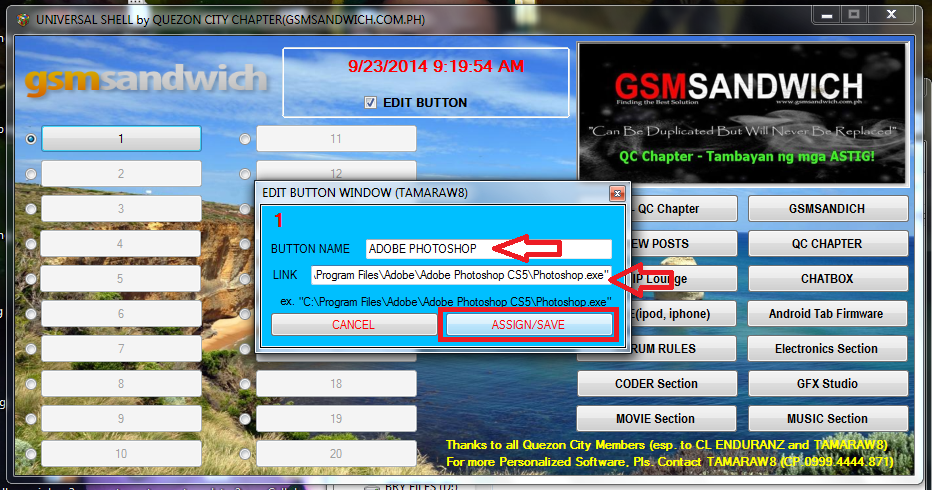


best Regards TAMARAW8

Saturday, September 6, 2014

UNIVERSAL SHELL (FREEDOWNLOAD HERE)

Software Name: UNIVERSAL SHELL by TAMARAW8

Descriptions:

You can assign different shortcut links & Name of other Software to every buttons and run it with a single click.


Purpose: To avoid messy and too much shortcuts in your Desktop


Author: TAMARAW8 (EL KAPAEROs)

LICENSE: FREE (NOT FORSALE)


Procedure to Assign a Shortcut in a Button.

1.Right Click your Shortcut, Select Properties, Shortcut. 

2. copy the link in TARGET:

3. Open UNIVERSAL SHELL & tick [ ]EDIT/ ASSIGN..

4. Select BUTTON You wish to EDIT 
5. Click that BUTTON and another window will appear
6. Assign a NAME for your Button
7. CTRL + V (PASTE) your copied link in button link
8. Press SAVE/ CLOSE and the software will restart