[CSRBv6] Cellphone Shop Record Book v6 by TAMARAW8
Released date: April 2, 2016
Finally i made it! I finished coding CSRB v6
after so many months of battling against Cancer.
I was diagnosed with stage 3 Testicular Cancer and undergone chemoteraphy sessions.
Now i finished my 4 cycles of chemoteraphy and now in recovery mode.
Thanks God for Miracle Healing!.. God is Great!
Prayer Works!!!
Features:
~Point of Sales (daily records, view and search)
~Inventory system (with using item codes, view and search)
~Job Order (Record for entrusted devices for repair)
~Repair Records (save records daily, view and search)
~Expenses Records(daily/monthly expenses, view and search)
Added features:
Print system
Automatic deduction of inventory records upon sold/pulled-out
Changeable color themes
Personalized Shopname and Address
100% portable(can be used withMemory Card or Flash Drive)
Please feel free to post any bugs you found
Please feel free to suggest additional features for future development.
DOWNLOAD HERE
Password. www.gsmsandwich.com.ph
TAMARAW8,s helpful tips, tricks and software collections. (Member: www.gsmsandwich.com.ph, www.unitedgsm.com.ph, www.gsmfriendly.com.ph, www.gsmhosting.com)
Showing posts with label tamaraw8. Show all posts
Friday, April 1, 2016
Wednesday, December 3, 2014
CELLPHONE SHOP RECORD BOOK V5
CELLPHONE SHOP RECORD BOOK v5!
Added Features:
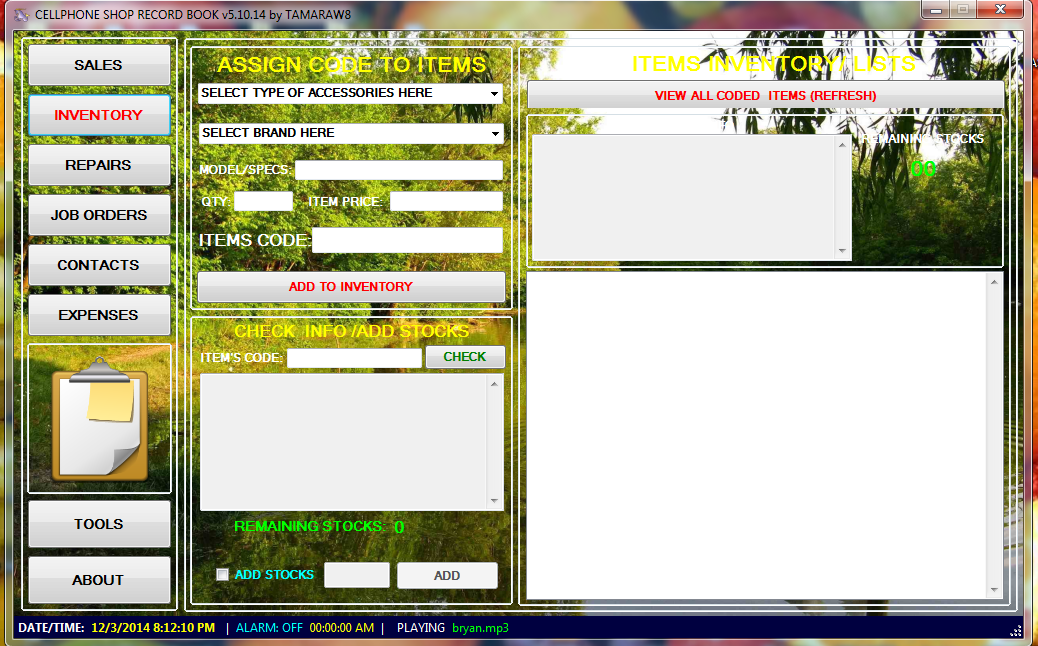
Inventory System - For Cellphone Accessories Stock Records
Item's Code - For easy inventory and automatic Stock Checking when Sold.
Music Player - Play some music for good vibes and good moods.
Alarm Clock - For time checking
Background Nature Image - for relaxing view of user interface
Calendar - For easy access of calendar checking
Repair Records automatically added to Daily Sales Report
Contacts records with facebook link
Features:
Repair Records
Daily Sales Report Records
Expenses records
Job Order records
other added tools by TAMARAW8
Universal Shell
TAMAROID Color Game
Text Inverter
Download Here.
Added Features:
Inventory System - For Cellphone Accessories Stock Records
Item's Code - For easy inventory and automatic Stock Checking when Sold.
Music Player - Play some music for good vibes and good moods.
Alarm Clock - For time checking
Background Nature Image - for relaxing view of user interface
Calendar - For easy access of calendar checking
Repair Records automatically added to Daily Sales Report
Contacts records with facebook link
Features:
Repair Records
Daily Sales Report Records
Expenses records
Job Order records
other added tools by TAMARAW8
Universal Shell
TAMAROID Color Game
Text Inverter
Download Here.
Friday, September 19, 2014
RUN ANDROID APPS IN WIN7 USING BLUESTACKS
Tools Needed:
1. Bluestacks installer
2. Google Account
3. Win7 Pc
Procedure.
1. Download and install bluestacks installer
2. Install (This takes time and need an internet connection while installing)
3. Once installed, Run it and log-in your Google Account
4. Select Games in Google Play Store and Download
Happy Gaming...
br. TAMARAW8
Tools Needed:
1. Bluestacks installer
2. Google Account
3. Win7 Pc
Procedure.
1. Download and install bluestacks installer
2. Install (This takes time and need an internet connection while installing)
3. Once installed, Run it and log-in your Google Account
4. Select Games in Google Play Store and Download
Happy Gaming...
br. TAMARAW8
Tuesday, August 26, 2014
Cellphone Shop Record Book (CSRB Version 3.0) Free Edition
Features:
SALES Section
-Automatically Saves Sales Entries by date, items, items code, reciept, & Customer's name.
-Automatically counts numbers of items sold for a day.
-VIEW/CLEAR today's Entries.
JOB ORDERS Section
-Automatically Saves Entries by Customer's Name, Contact Number, Brand/Model, IMEI, & Recieved by.
-Automatic Job Order Number
-Entries Can be print & Duplicated.
-Automatic Cost of Repairs Down Payment & Balance Calculation.
REPAIRS Section
-Automatically Saves Entries by Customer's Name, Contact Number, Brand/Model, IMEI, & Technician.
EXPENSES Section
-Automatically Saves Entries by Type of expenses & expenses by.
-Types of Expenses.(Travel, Office Supplies, Personal, Food, Shop, House Rent, Shop Rent, Refund & Others).
RECORDS Section
-Easy Search by Date, Customer's Name, Employees Name, Expenses type, Repairs, Items Code, Reciept, Technician.
TIME CARD Section
-Add Employee.
-TIme-in/out for employees.
SETTINGS Section
-Change SKIN Color to any Color
-Change Result Windows Background Color and Font Colors.
-OPtions to Change/Save SHOP NAME & SHOP'S address and Contact Numbers.
-Options to change Job Order's Starting NUmber.
ABOUT Section
-All About El Kapaeros'Logo & Active Members.
-Donate Button for PAYPAL.
-LInk to visit www.tamaraw8.blogspot.com
-Adds Name of Repair Shop/Store.
-Adds Address & NUmber
Extra Features
-CLEAR SCREEN Button.
-PRINT Button.
-SYstem's DATE & TIME.
GSM TOOLS
-Android Multi-Tools by SE THailand.
-Z3X Box Shortcut.
-Blackberry Loader Shortcut.
-Blackberry Tool by MAsterSolid & Danney.
-iPhone BaseBand Checker for 3GS.
Saturday, August 16, 2014
POLAROID mid0728PHP01.133, All winner A20 CPU, LED LIghts Only [SOLUTION]
BRAND: POLARIOD
MODEL: MID0728PHP01.133
PROBLEM: LED Lights only
BOARD INFO: 2013-04-28 A70X V4 (ALLWINNER A20 Dual COre Chip)
FILE NEEDED:
1. Phoenix SUit
2. A70x v4 Firmware
PROCEDURES:
1. Run PhoenixSuit
2. Click FIRMWARE tab, CLick IMAGE and Browse for the firmware
3. Press and HOLD VOLUME UP, Then insert USB cable, then Press POWER Button, 2x every 1 seconds for atleast 15 to 20 seconds or if Phonexsuits ask to press OK to continue flashing..
Just wait untill finish
br. TAMARAW8
MODEL: MID0728PHP01.133
PROBLEM: LED Lights only
BOARD INFO: 2013-04-28 A70X V4 (ALLWINNER A20 Dual COre Chip)
FILE NEEDED:
1. Phoenix SUit
2. A70x v4 Firmware
PROCEDURES:
1. Run PhoenixSuit
2. Click FIRMWARE tab, CLick IMAGE and Browse for the firmware
3. Press and HOLD VOLUME UP, Then insert USB cable, then Press POWER Button, 2x every 1 seconds for atleast 15 to 20 seconds or if Phonexsuits ask to press OK to continue flashing..
Just wait untill finish
br. TAMARAW8
CHERRY MOBILE THUNDER 2.0 HANG in LOGO SOLUTION HERE
PROBLEM: Hang only in Android Logo
SOLUTION: Flash with Stock ROM using SP FLASH TOOL
FILES NEEDED:
1. All MTK usb Drivers
2. SP Flash Tool..
3. Cherry Mobile Thunder 2.0 Firmware(pass: james3)
PROCEDURES:
Install usb Driver First.
1. OPen SP Flash Tools
2. CLick Scatter-Loading then locate MT6589_Android_scatter_emmc.txt
3. Click Download
4. Select YES when Download Warning Appears.
5. Reattach Battery in Phone(Phone must be off)
6. Connect phone to usb while pressing Volume up + Power Button
Then SP FLash Flash tool will automatically detects phone and start to flash
Just wait for the Color Green Round icon to appear.
7. Remove phone from usb, reattach Battery then Power it ON.. Congrats..
br. TAMARAW8
PROBLEM: Hang only in Android Logo
SOLUTION: Flash with Stock ROM using SP FLASH TOOL
FILES NEEDED:
1. All MTK usb Drivers
2. SP Flash Tool..
3. Cherry Mobile Thunder 2.0 Firmware(pass: james3)
PROCEDURES:
Install usb Driver First.
1. OPen SP Flash Tools
2. CLick Scatter-Loading then locate MT6589_Android_scatter_emmc.txt
3. Click Download
4. Select YES when Download Warning Appears.
5. Reattach Battery in Phone(Phone must be off)
6. Connect phone to usb while pressing Volume up + Power Button
Then SP FLash Flash tool will automatically detects phone and start to flash
Just wait for the Color Green Round icon to appear.
7. Remove phone from usb, reattach Battery then Power it ON.. Congrats..
br. TAMARAW8
Saturday, August 2, 2014
BLACKBERRY Z10 (STL100-2) FORGOTTEN PASSWORD SOLUTION
NOTE: This procedure works but DO IT AT YOUR OWN RISKS.
I am not Liable to any errors or bricked you made in your phone.
First of all your battery must be fully charged!
Second, Be known that all of your DATA will be erased/wiped during this process.
Is your Blackberry Z10 Password Attempt almost timed-out?
Are you willing to lost all of your datas' in your blackberry z10?
Are you willing to wait atleast 1 to 2 hours to finish your BB z10's wiping process?
if your answer is YES, then let's continue...
Just consume all of your blackberry z10's remaining password attempt to zero (0).
Then Enter the word "Blackberry" in your last attempt
Then your BB will restart with this Screen.
NOTE: Be Patientat this point, it mostlytakes 1 to 2 hours to finish,
Plug-in your charger to avoid any interuptions/problems during wiping
After an hour.. Your BB will reboot
and with this Welcome screen, You should have a WIFI network
to connect and ENTER your Google account
Best Regards. TAMARAW8
Subscribe to:
Posts (Atom)